
Cart is empty.
 Home
Home Products
 Products comparison
 Case Studies
 Customers Projects
 Support
.png)




This page is about how to connect analog sensors to smartDEN IP-Maxi Ethernet I/O relay modules. With these sensors, it is possible to measure temperature, humidity, distance and light levels, to monitor the measurements through a web browser and to control relays or send notifications according to the measured values.
- What is the purpose of this web page?
- For which devices is this tutorial?
- smartDEN IP-Maxi analog inputs (0-10V)
- Power supply for the analog sensors
- Analog Inputs settings in the web interface
- Connecting LM35DZ (temperature sensor)
- Connecting LM335Z (temperature sensor)
- Connecting HIH-4000 (humidity sensor)
- Connecting GP2Y0A21YK (distance sensor)
- Connecting TSL250R (light to voltage optical sensor)
What is the purpose of this web page?
The main purpose of this article is to help customers connect different analog sensors to the 0-10V analog inputs of our smartDEN IP-Maxi modules. The examples cover LM35DZ and LM335Z temperature sensors, the HIH-4000 humidity sensor, the GP2Y0A21YK infrared distance sensor and the TSL250R light sensor. The article includes example connection diagrams, web interface settings and basic calculations.
Unlike some older DAEnetIP controllers, smartDEN IP-Maxi has 0-10V analog inputs, so the listed sensors can be connected without external voltage dividers, provided their output voltage stays within the allowed range. However, the LM335Z needs a bias resistor and the 5V sensors need a suitable power supply.
For more information about the hardware, analog inputs and scaling features please refer to the  smartDEN IP-Maxi-XX User Manual, in particular Sections 5, 6.3 and 8.7.
As in our other application notes, the Custom Calculator Excel file can be used for additional calculations. For smartDEN IP-Maxi, the ADC voltage range is 0-10V and the scaling values are entered directly in the web interface.
For which devices is this tutorial?
This tutorial is useful for the smartDEN IP-Maxi-XX series, including the following models (12V and 24V versions):
|
Order number
|
Device name and link
|
| smartDEN IP-Maxi-12V | smartDEN IP-Maxi - SNMP, HTTP, 12V |
| smartDEN IP-Maxi-24V | smartDEN IP-Maxi - SNMP, HTTP, 24V |
| smartDEN IP-Maxi-MT-12V | smartDEN IP-Maxi-MT - Modbus TCP, 12V |
| smartDEN IP-Maxi-MT-24V | smartDEN IP-Maxi-MT - Modbus TCP, 24V |
| smartDEN IP-Maxi-MQ-12V | smartDEN IP-Maxi-MQ - MQTT, HTTP, 12V |
| smartDEN IP-Maxi-MQ-24V | smartDEN IP-Maxi-MQ - MQTT, HTTP, 24V |
smartDEN IP-Maxi analog inputs (0-10V)
The analog inputs are located on the lower terminal block and are marked AGND, Ain1, Ain2, Ain3 and Ain4. The module also provides a +VCC auxiliary power output for sensors (12V or 24V depending on the selected module version). The positions are shown in Figure 5.1 of the user manual.
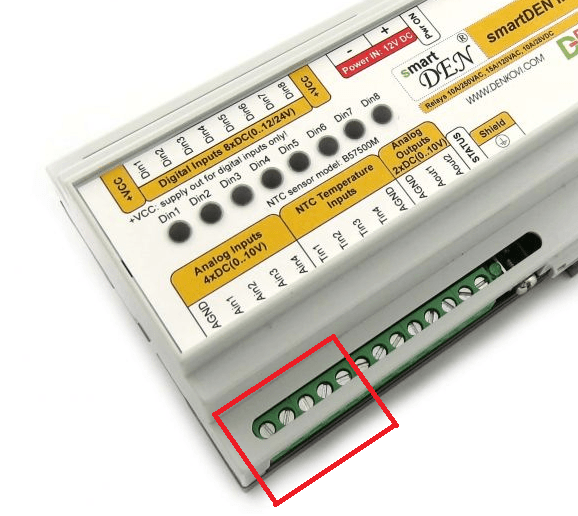
- The module has four general-purpose analog voltage inputs: AIN1, AIN2, AIN3 and AIN4. Any of these inputs can be used for any one of the example sensors.
- The ADC resolution is 10 bits (0 to 1023 units). The nominal voltage step is about 9.77mV per ADC unit.
- Use the AGND terminal as the analog signal reference. The sensor ground and the controller analog ground must be common. Pay attention to the polarity of the 12/24V auxiliary supply.
- The separate TIN1-TIN4 terminals are intended for B57500M NTC thermistors, not for these five voltage-output sensors.
- Only four sensors at a time can be connected to the four 0-10V analog inputs. The connections below are alternative examples.
Power supply for the analog sensors
LM35DZ and LM335Z can be supplied from the auxiliary +VCC output (12/24V), subject to their electrical specifications and the resistor shown for LM335Z. For the sensors requiring 5V DC (HIH-4000, GP2Y0A21YK and TSL250R), the connection diagrams show an external regulated +5V DC supply. This can be a suitable 5V power source or a 12/24V to 5V DC/DC step-down converter powered from the smartDEN IP-Maxi auxiliary supply, so a separate mains power adapter is not required.
Example DC/DC models are Traco Power TSR 1-2450 (6.5-36V input, 5V/1A output) or Murata OKI-78SR-5/1.5-W36-C (7-36V input, 5V/1.5A output). Other suitable regulated step-down converters may be used as well.
- If a DC/DC converter is used, connect its input to the 12/24V auxiliary +VCC and corresponding return of the controller power supply.
- Connect the regulated +5V output to the sensor supply pin and its 0V/GND to the common analog reference (AGND). With non-isolated converters, input and output returns are generally common; check the converter datasheet.
- Use a stable power supply with enough current for the module and all connected sensors. Add decoupling components close to sensors where required by their datasheets.
- Important: Never apply 12V or 24V directly to the 5V-only sensors, and never connect the 12/24V auxiliary output directly to an AIN input. The normal analog measurement range is 0-10V.
Analog Inputs settings in the web interface
In the web interface, open Analog Inputs to configure Input 1 to Input 4. The parameters Min and Max define the linear conversion of ADC readings into engineering units. For example, temperature can be displayed in degC instead of ADC counts. The Label field allows up to 4 characters.
Firmware scaling formula: Measured Value = Min + ((Max - Min) / 1024) × ADC Value. The ADC Value is from 0 to 1023. The examples below use nominal sensor data and should be calibrated for precise measurements.
With 0-10V and 10-bit ADC resolution, one ADC unit is about 9.77mV. For LM35DZ or LM335Z this corresponds to approximately 0.98°C, so the displayed temperature resolution is limited to about 1°C without additional signal conditioning.
The web interface also provides Low Threshold and High Threshold for SNMP traps (smartDEN IP-Maxi) and MQTT notifications (smartDEN IP-Maxi-MQ). A relay may be configured to react to an analog input under Relays Settings. The communication protocol depends on the module version.
Connecting LM35DZ (temperature sensor) to smartDEN IP-Maxi
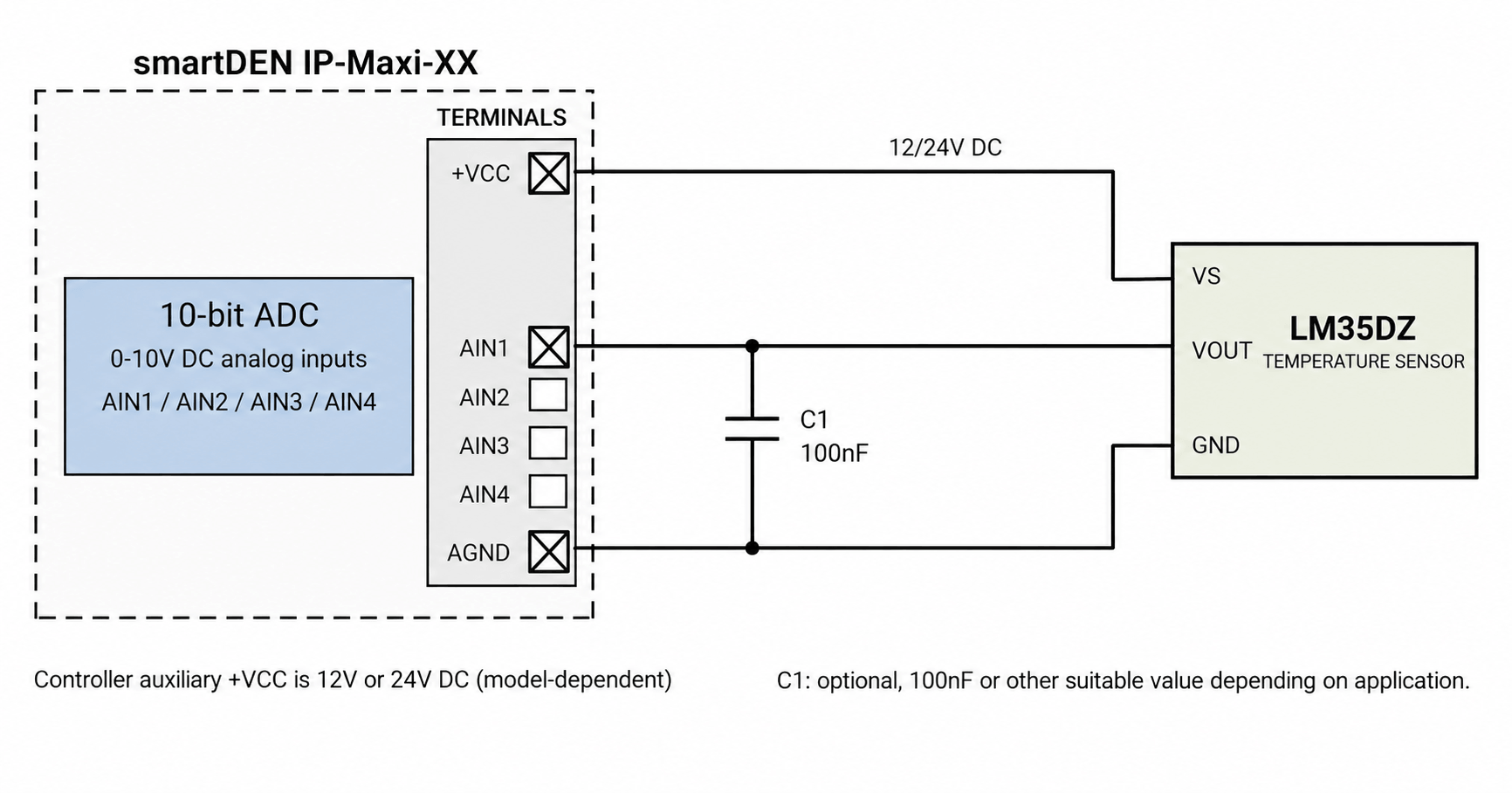
- LM35DZ can be bought from our webshop as well - here.
- LM35DZ is an analog temperature sensor with a linear voltage output of 10mV/°C. The LM35DZ version measures approximately 0°C to 100°C in this single-supply connection.
- LM35DZ datasheet - here.
- Connect the LM35DZ supply pin (+Vs) to +VCC (12/24V), the ground pin to AGND, and the output pin to AIN1 (or another free 0-10V input). LM35DZ supports 4-30V power supply.
- No additional voltage divider is necessary, because the sensor output remains within 0-1V for 0-100°C.
- C1 is optional (100nF or another suitable value depending on the application) and is shown between AIN1 and AGND. When used with LM35DZ, consider the datasheet precautions for capacitive loading of its output.
- When longer wiring is used, additional cable and noise filtering may be required. The example connection has not been verified in our laboratory.
- Web interface settings: Analog Inputs → selected AIN → Min = 0.0, Max = 1000.0, Label = degC. This converts VOUT = 0.01 × Temperature(°C).
- Example: at 25°C the sensor output is approximately 0.250V, which corresponds to approximately 26 ADC units. The value displayed by the module is quantized by the ADC resolution.
- Some data, which may help you:
|
Parameter
|
Value
|
Dimension
|
Note
|
| ADCRes | 10 | bits | Analog-to-digital converter resolution |
| InputRange | 0 to 10 | V | smartDEN IP-Maxi general-purpose analog input range |
| SensorRes | 0.01 | V / °C | LM35DZ nominal sensitivity |
| SensMin | 0 | °C | Sensor lower range for this circuit |
| SensMax | 100 | °C | Sensor upper range for this circuit |
| Vtest | 25 | °C | Example temperature |
| Vvalue | 0.250 | V | Output voltage at 25°C (nominal) |
| ADCstep | ~0.98 | °C / ADC unit | Nominal temperature per ADC count |
Connecting LM335Z (temperature sensor) to smartDEN IP-Maxi
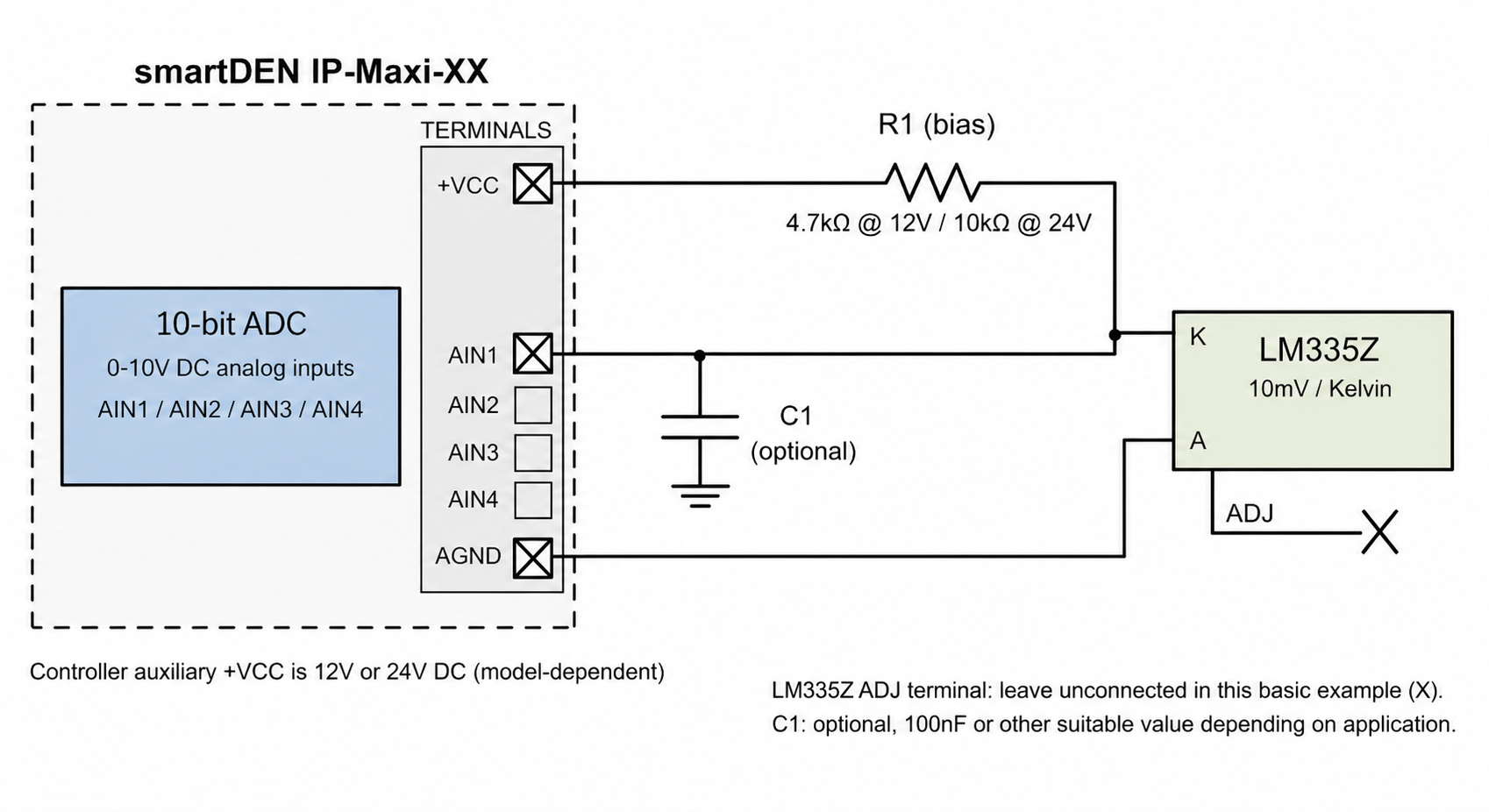
- LM335Z can be bought from our webshop as well - here.
- LM335Z is a temperature sensor with an output proportional to absolute temperature: 10mV/K. At 0°C its nominal output is about 2.7315V, and at 25°C about 2.9815V.
- LM335Z datasheet - here.
- LM335Z must be biased with a series resistor R1: example values are 4.7kΩ for a 12V module or 10kΩ for a 24V module, giving approximately 1.9mA at 12V and 2.1mA at 24V (at 25°C). The resistor must be selected for the actual supply voltage and required sensor bias current.
- Connect the sensor cathode (K) to the AIN1 measuring point and to R1, and the sensor anode (A) to AGND. Leave its adjustment lead unconnected for the basic uncalibrated circuit. Check the device package pinout in the datasheet before wiring.
- C1 is optional (100nF or another suitable value depending on the application) and is connected between AIN1 and AGND.
- No ADC voltage divider is necessary: the sensor output remains around 2.3-3.7V over its usual operating temperature range.
- Web interface settings: Analog Inputs → selected AIN → Min = -273.2, Max = 726.8, Label = degC. These values approximate Temperature(°C) = (VOUT / 0.01) - 273.15.
- For accurate temperature measurement, follow the LM335Z calibration recommendations. The 0-10V ADC resolution corresponds to approximately 0.98°C per count.
- Some data, which may help you:
|
Parameter
|
Value
|
Dimension
|
Note
|
| ADCRes | 10 | bits | Analog input resolution |
| InputRange | 0 to 10 | V | smartDEN IP-Maxi analog input range |
| R1 (12V) | 4.7 | kΩ | Example nominal sensor bias resistor |
| R1 (24V) | 10 | kΩ | Example nominal sensor bias resistor |
| SensMin | -40 | °C | Typical LM335Z sensor range example |
| SensMax | 100 | °C | Typical LM335Z sensor range example |
| SensorRes | 0.01 | V / K | Sensor sensitivity |
| Vtest | 25 | °C | Example temperature |
| Vvalue | 2.9815 | V | Nominal voltage at 25°C |
| ADCstep | ~0.98 | °C / ADC unit | Nominal temperature per ADC count |
Connecting HIH-4000 (humidity sensor) to smartDEN IP-Maxi
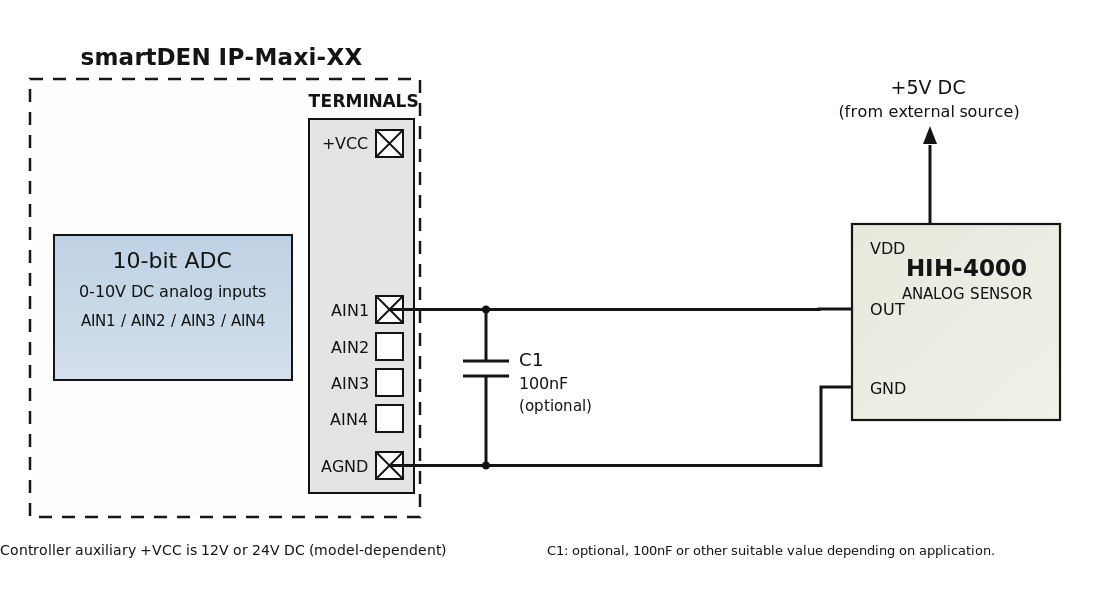
- HIH-4000 can be bought from our webshop as well - here.
- HIH-4000 is a relative humidity sensor with a near-linear voltage output for 0 to 100% RH. Typical output voltage at 25°C with a regulated 5V supply is about 0.80V at 0% RH and 3.90V at 100% RH.
- HIH-4000 datasheet - here.
- Connect HIH-4000 VDD to a regulated external +5V supply (for example, from a suitable 12/24V to 5V DC/DC converter), GND to AGND, and VOUT to AIN1 (or another free 0-10V input). Check the pinout of your HIH-4000 package.
- Use a stable and accurate 5V supply, because the output is ratiometric. C1 is optional (100nF or another suitable value depending on the application) and is shown between AIN1 and AGND for analog input filtering.
- The nominal first-order sensor equation at 25°C is VOUT = 5 × (0.0062 × RH + 0.16). Thus RH = (VOUT - 0.80) / 0.031 (for RH in %).
- Web interface settings: Analog Inputs → selected AIN → Min = -25.8, Max = 296.8, Label = %RH. These nominal values are calculated for the full 0-10V analog input scale.
- For better accuracy, use the individual calibration information supplied with the sensor where available and compensate the humidity measurement for temperature when required.
- Some data, which may help you:
|
Parameter
|
Value
|
Dimension
|
Note
|
| ADCRes | 10 | bits | Analog input resolution |
| InputRange | 0 to 10 | V | smartDEN IP-Maxi analog input range |
| Vsupply | 5.0 | V DC | Regulated external +5V DC supply |
| SensMin | 0 | %RH | Sensor lower humidity range |
| SensMax | 100 | %RH | Sensor upper humidity range |
| SensorRes | 0.031 | V / %RH | Typical slope at 5V and 25°C |
| Voffset | 0.800 | V | Nominal output at 0% RH |
| Vtest | 50 | %RH | Example relative humidity |
| Vvalue | 2.350 | V | Nominal output at 50% RH |
| ADCstep | ~0.315 | %RH / ADC unit | Nominal humidity per ADC count |
Connecting GP2Y0A21YK (distance sensor) to smartDEN IP-Maxi
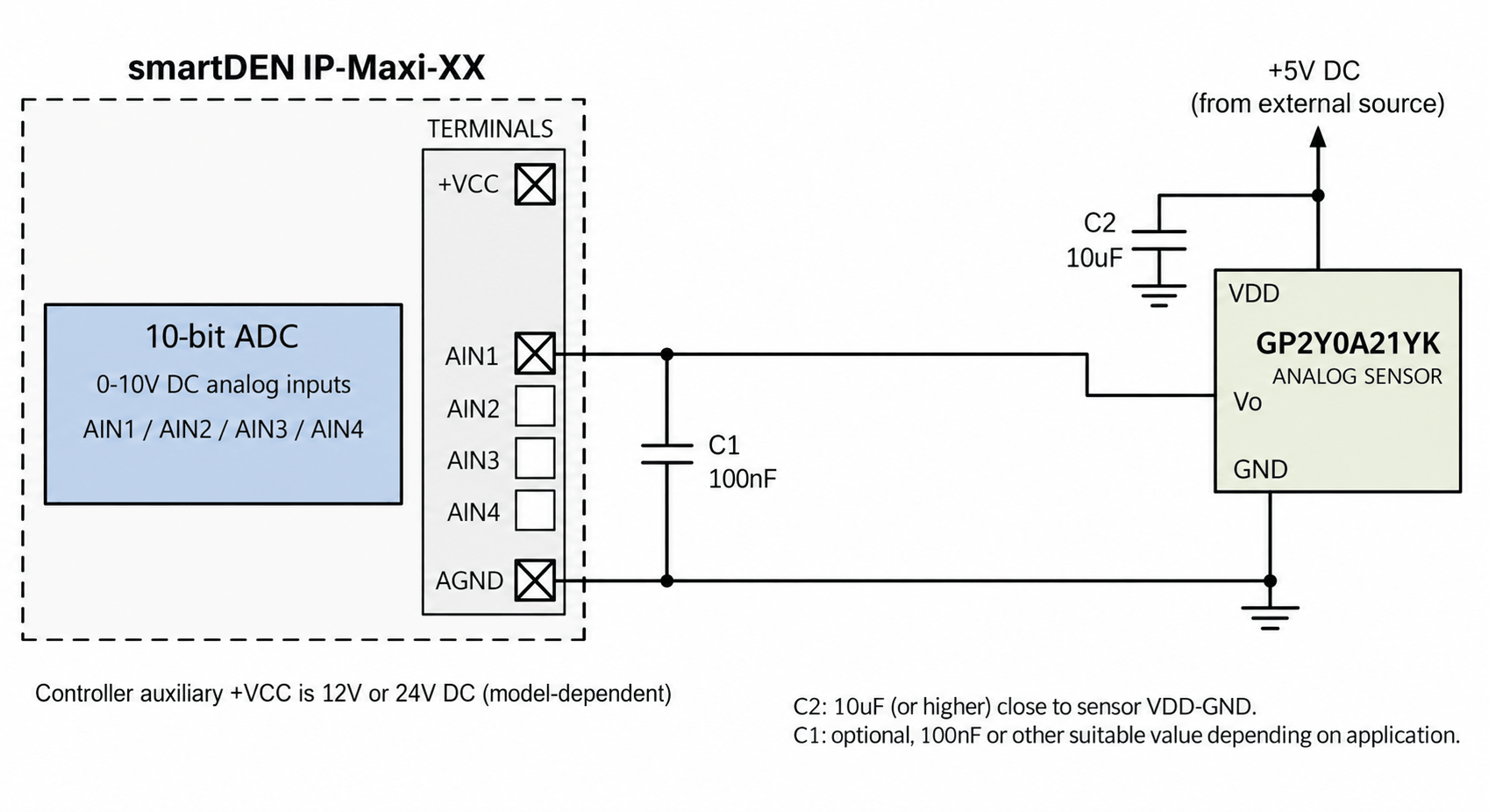
- GP2Y0A21YK can be bought from our webshop as well - here.
- GP2Y0A21YK is a Sharp infrared distance sensor measuring approximately 10cm to 80cm. Its voltage output is non-linear in relation to distance (typically higher at a smaller distance).
- GP2Y0A21YK datasheet - here.
- Power the sensor from a regulated external +5V DC supply (for example, using a suitable 12/24V to 5V DC/DC converter). Connect VOUT to AIN1 and sensor GND to AGND. Check the connector pin numbering in the Sharp datasheet.
- Place C2 (10µF or larger) between sensor VDD (+5V) and GND, close to the sensor. C1 (optional, 100nF or another suitable value) is connected between AIN1 and AGND for analog input filtering. Use a 5V supply that can handle the sensor current pulses. The average consumption is about 30mA (40mA maximum under datasheet conditions).
- Because the output is non-linear, the standard two-point Min/Max scaling cannot show accurate distances over the full 10-80cm range. For a simple proximity trigger, it is convenient to display voltage and set a relay threshold determined experimentally.
- Web interface settings: Analog Inputs → selected AIN → Min = 0.0, Max = 10.0, Label = Volt. The controller will display the analog voltage. Typical example readings are around 3.1V at 10cm and 0.4V at 80cm; they depend on the target and environment.
- For distance in cm, measure and calibrate several points and perform a non-linear conversion in an external application (for example, a lookup table or curve fitting).
- Some data, which may help you:
|
Parameter
|
Value
|
Dimension
|
Note
|
| ADCRes | 10 | bits | Analog input resolution |
| Vsupply | 5.0 | V DC | From regulated external +5V DC supply |
| SensMin | 10 | cm | Minimum specified measurement distance |
| SensMax | 80 | cm | Maximum specified measurement distance |
| Vtest (near) | ~3.1 | V | Typical voltage near 10cm (indicative) |
| Vtest (far) | ~0.4 | V | Typical voltage near 80cm (indicative) |
| Iavg | 30 | mA | Typical sensor supply current |
| C1 (optional) | 100 | nF | Analog input filter between AIN1 and AGND; value depends on application |
| C2 | ≥10 | µF | Bypass capacitor close to sensor VDD-GND |
Connecting TSL250R (light to voltage optical sensor) to smartDEN IP-Maxi
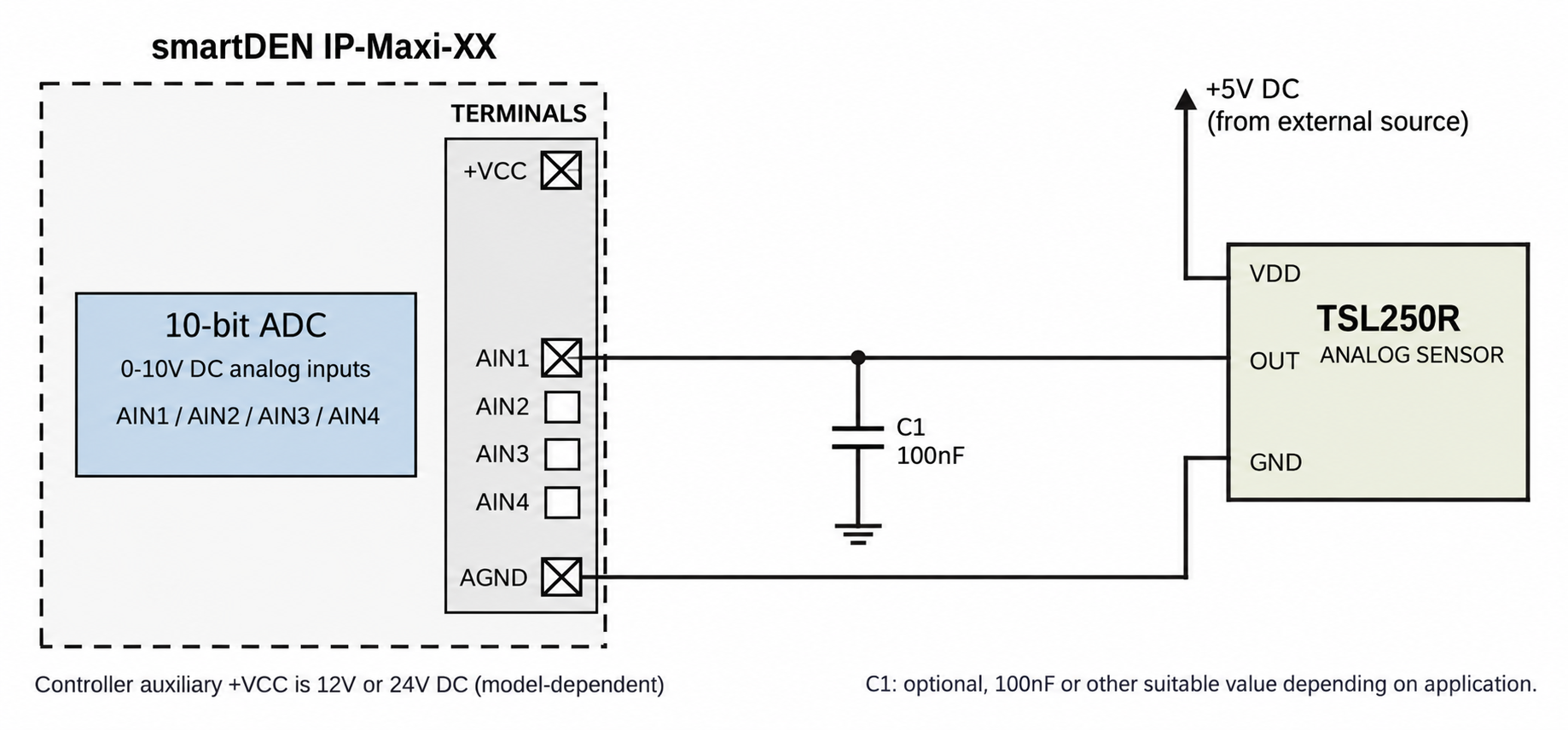
- TSL250R can be bought from our webshop as well - here.
- TSL250R is a light-to-voltage optical sensor. Its output voltage is approximately proportional to the incoming irradiance over the specified operating range and wavelength conditions.
- TSL250R datasheet - here.
- Power the sensor from a regulated external +5V DC supply (for example, using a suitable 12/24V to 5V DC/DC converter). Connect the sensor output (pin 3) to AIN1, VDD (pin 2) to 5V and GND (pin 1) to AGND (pin numbers for the package front view shown in the datasheet).
- C1 is optional (100nF or another suitable value depending on the application) and is connected between AIN1 and AGND for analog input filtering. The datasheet characteristics are specified with a 10kΩ output load; for quantitative irradiance calibration, follow the full datasheet test conditions.
- Because the sensitivity depends on the incident light wavelength, the sensor is most convenient for comparing relative light levels or for setting a light-triggered relay threshold. It is not a calibrated lux meter without additional calibration.
- Web interface settings: Analog Inputs → selected AIN → Min = 0.0, Max = 10.0, Label = Volt. Set the relay threshold according to the voltage observed under your real lighting conditions.
- Other sensors of this series, TSL251R and TSL252R, have different sensitivity and may be connected in a similar way subject to their datasheets.
- Some data, which may help you:
|
Parameter
|
Value
|
Dimension
|
Note
|
| ADCRes | 10 | bits | Analog input resolution |
| Vsupply | 5.0 | V DC | From regulated external +5V DC supply |
| SensType | Light to voltage | — | Output depends on optical irradiance |
| Vdark | ~0.004 | V | Typical dark voltage (datasheet conditions) |
| Vout example | ~2.0 | V | Typical at 14.6µW/cm² and λ=635nm (datasheet conditions) |
| Supply current | ~1.1 | mA | Typical |
| Scale | 0 to 10 | Volt | Recommended initial web-display scale |
Note: The drawings are example electrical connections based on the manufacturers' datasheets and the smartDEN IP-Maxi-XX user manual. They have not been verified by a physical laboratory test. Before installation, verify the exact sensor package pinout, supply polarity, converter specifications and module model. For long sensor cables or electrically noisy installations, additional measures may be required.


